> ## Documentation Index
> Fetch the complete documentation index at: https://docs.chainlit.io/llms.txt
> Use this file to discover all available pages before exploring further.
# MCP
> Model Control Protocol (MCP) allows you to integrate external tool providers with your Chainlit application. This enables your AI models to use tools through standardized interfaces.
## Overview
MCP provides a mechanism for Chainlit applications to connect to either server-sent events (SSE) or streamable HTTP based services, or command-line (stdio) based tools. Once connected, your application can discover available tools, execute them, and integrate their responses into your application's flow.
End to end cookbook example showcasing MCP tool calling with Claude.
### Contact us for Enterprise Ready MCP
We're working with companies to create their MCP stacks, enabling AI agents to consume their data and context in standardized ways. Fill out this [form](https://docs.google.com/forms/d/e/1FAIpQLSdObSIeIFt4nHppZ6r2rIoEe-jZRo4CqxbmRKKgb-ZsSPONnQ/viewform?usp=dialog).
## Connections Types
| WebSockets | HTTP+SSE | Streamable HTTP | stdio |
| ---------- | -------- | --------------- | ----- |
| ❌ | ✅ | ✅ | ✅ |
Chainlit supports three types of MCP connections:
1. **SSE (Server-Sent Events)**: Connect to a remote service via HTTP
2. **Streamable HTTP**: Send HTTP requests to a server and receive JSON responses or connect using SSE streams
3. **stdio**: Execute a local command and communicate via standard I/O
> ⚠️ **Security Warning**: The stdio connection type spawns actual subprocesses on the Chainlit server. Only use this with trusted commands in controlled environments. Ensure proper validation of user inputs to prevent command injection vulnerabilities.
**Command Availability Warning**: When using the stdio connection type with commands like `npx` or `uvx`, these commands must be available on the Chainlit server where the application is running. The subprocess is executed on the server, not on the client machine.
### Server-Side Configuration (`config.toml`)
You can control which MCP connection types are enabled globally and restrict allowed stdio commands by modifying your project's `config.toml` file (usually located at the root of your project or `.chainlit/config.toml`).
Under the `[features.mcp]` section, you can configure SSE, Streamable HTTP and stdio separately:
Since Chainlit 2.7.0, `mcp.enabled` must be explicitly set to `true` in `config.toml`. It is no longer auto-inferred from the existence of an `on_mcp_connect` callback.
```toml theme={null}
[features]
# ... other feature flags
[features.mcp]
# Enable or disable MCP features globally
enabled = false
[features.mcp.sse]
# Enable or disable the SSE connection type globally
enabled = true
[features.mcp.streamable-http]
# Enable or disable the Streamable HTTP connection type globally
enabled = true
[features.mcp.stdio]
# Enable or disable the stdio connection type globally
enabled = true
# Define an allowlist of executables for the stdio type.
# Only the base names of executables listed here can be used.
# This is a crucial security measure for stdio connections.
# Example: allows running `npx ...` and `uvx ...` but blocks others.
allowed_executables = [ "npx", "uvx" ]
```
## Setup
### 1. Register Connection Handlers
To use MCP in your Chainlit application, you need to implement the `on_mcp_connect` handler. The `on_mcp_disconnect` handler is optional but recommended for proper cleanup.
```python theme={null}
import chainlit as cl
from mcp import ClientSession
@cl.on_mcp_connect
async def on_mcp_connect(connection, session: ClientSession):
"""Called when an MCP connection is established"""
# Your connection initialization code here
# This handler is required for MCP to work
@cl.on_mcp_disconnect
async def on_mcp_disconnect(name: str, session: ClientSession):
"""Called when an MCP connection is terminated"""
# Your cleanup code here
# This handler is optional
```
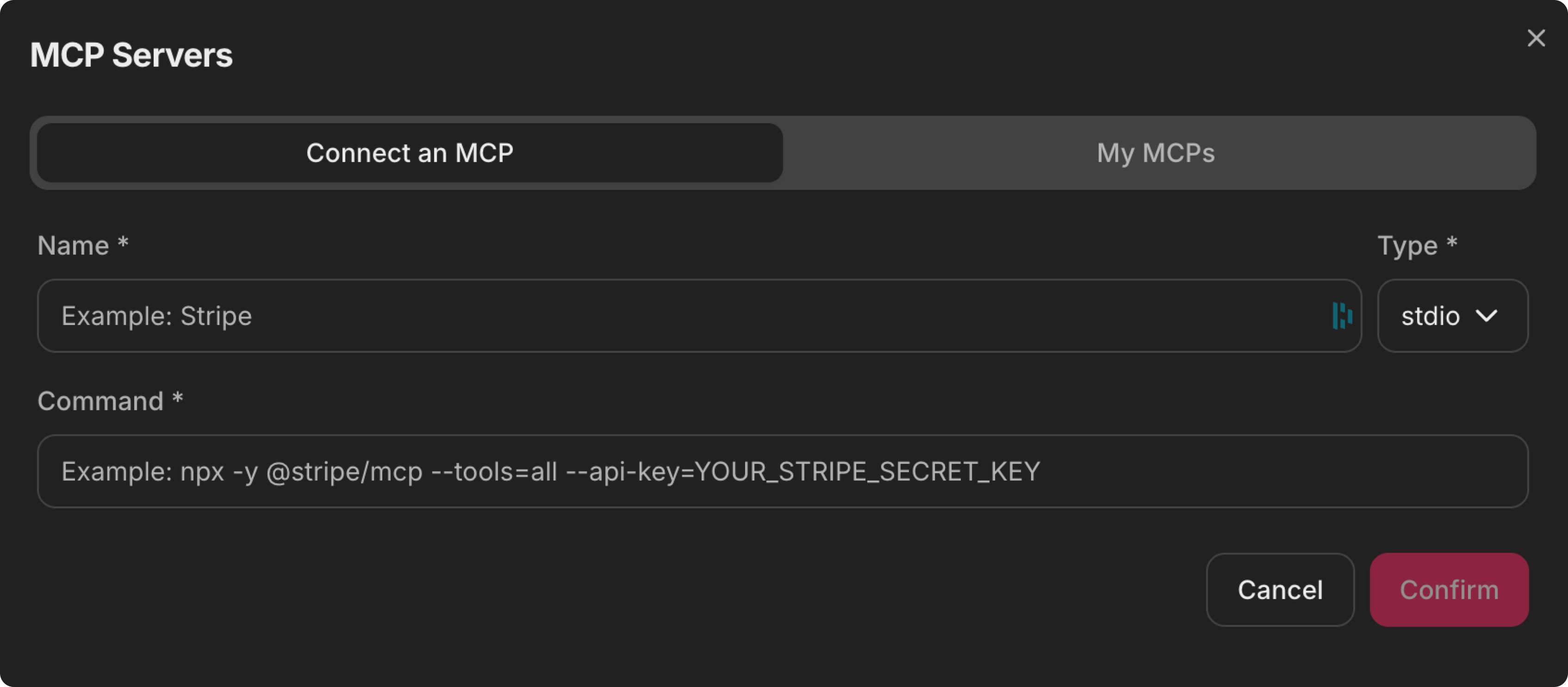
### 2. Client Configuration
The client needs to provide the connection details through the Chainlit interface. This includes:
* Connection name (unique identifier)
* Client type (`sse`, `streamable-http` or `stdio`)
* For SSE and Streamable HTTP: URL endpoint
* For stdio: Full command (e.g., `npx your-tool-package` or `uvx your-tool-package`)
 ## Working with MCP Connections
### Retrieving Available Tools
Upon connection, you can discover the available tools provided by the MCP service:
```python theme={null}
@cl.on_mcp_connect
async def on_mcp(connection, session: ClientSession):
# List available tools
result = await session.list_tools()
# Process tool metadata
tools = [{
"name": t.name,
"description": t.description,
"input_schema": t.inputSchema,
} for t in result.tools]
# Store tools for later use
mcp_tools = cl.user_session.get("mcp_tools", {})
mcp_tools[connection.name] = tools
cl.user_session.set("mcp_tools", mcp_tools)
```
### Executing Tools
You can execute tools using the MCP session:
```python theme={null}
@cl.step(type="tool")
async def call_tool(tool_use):
tool_name = tool_use.name
tool_input = tool_use.input
# Find appropriate MCP connection for this tool
mcp_name = find_mcp_for_tool(tool_name)
# Get the MCP session
mcp_session, _ = cl.context.session.mcp_sessions.get(mcp_name)
# Call the tool
result = await mcp_session.call_tool(tool_name, tool_input)
return result
```
## Integrating with LLMs
MCP tools can be seamlessly integrated with LLMs that support tool calling:
```python theme={null}
async def call_model_with_tools():
# Get tools from all MCP connections
mcp_tools = cl.user_session.get("mcp_tools", {})
all_tools = [tool for connection_tools in mcp_tools.values() for tool in connection_tools]
# Call your LLM with the tools
response = await your_llm_client.call(
messages=messages,
tools=all_tools
)
# Handle tool calls if needed
if response.has_tool_calls():
# Process tool calls
pass
return response
```
## Session Management
MCP connections are managed at the session level. Each WebSocket session can have multiple named MCP connections. The connections are cleaned up when:
1. The user explicitly disconnects
2. The same connection name is reused (old connection is replaced)
3. The WebSocket session ends
## Working with MCP Connections
### Retrieving Available Tools
Upon connection, you can discover the available tools provided by the MCP service:
```python theme={null}
@cl.on_mcp_connect
async def on_mcp(connection, session: ClientSession):
# List available tools
result = await session.list_tools()
# Process tool metadata
tools = [{
"name": t.name,
"description": t.description,
"input_schema": t.inputSchema,
} for t in result.tools]
# Store tools for later use
mcp_tools = cl.user_session.get("mcp_tools", {})
mcp_tools[connection.name] = tools
cl.user_session.set("mcp_tools", mcp_tools)
```
### Executing Tools
You can execute tools using the MCP session:
```python theme={null}
@cl.step(type="tool")
async def call_tool(tool_use):
tool_name = tool_use.name
tool_input = tool_use.input
# Find appropriate MCP connection for this tool
mcp_name = find_mcp_for_tool(tool_name)
# Get the MCP session
mcp_session, _ = cl.context.session.mcp_sessions.get(mcp_name)
# Call the tool
result = await mcp_session.call_tool(tool_name, tool_input)
return result
```
## Integrating with LLMs
MCP tools can be seamlessly integrated with LLMs that support tool calling:
```python theme={null}
async def call_model_with_tools():
# Get tools from all MCP connections
mcp_tools = cl.user_session.get("mcp_tools", {})
all_tools = [tool for connection_tools in mcp_tools.values() for tool in connection_tools]
# Call your LLM with the tools
response = await your_llm_client.call(
messages=messages,
tools=all_tools
)
# Handle tool calls if needed
if response.has_tool_calls():
# Process tool calls
pass
return response
```
## Session Management
MCP connections are managed at the session level. Each WebSocket session can have multiple named MCP connections. The connections are cleaned up when:
1. The user explicitly disconnects
2. The same connection name is reused (old connection is replaced)
3. The WebSocket session ends