> ## Documentation Index
> Fetch the complete documentation index at: https://docs.chainlit.io/llms.txt
> Use this file to discover all available pages before exploring further.
# Chat Settings
The `ChatSettings` class is designed to create and send a dynamic form to the UI. This form can be updated by the user.
## Attributes
The fields of the form. Mutually exclusive with `tabs` — use one or the other.
Group inputs into named tabs. Each `Tab` has an `id`, a `label`, and its own list of `inputs`.
Mutually exclusive with the top-level `inputs` list.
## Methods
### `send()`
Sends the settings form to the UI **and** commits the current values into the session (`session.chat_settings`). Use this when initializing settings or when you want to update both the UI and the committed session state.
### `refresh()`
Pushes the settings form to the UI **without** updating the committed session settings. This is useful inside `@cl.on_settings_edit` when you want to dynamically update the available widgets (e.g., show/hide fields based on a selection) without treating the edit as a confirmed change.
Since version **2.11.0**.
## Usage
```python theme={null}
import chainlit as cl
from chainlit.input_widget import Select, Switch, Slider
@cl.on_chat_start
async def start():
settings = await cl.ChatSettings(
[
Select(
id="Model",
label="OpenAI - Model",
values=["gpt-3.5-turbo", "gpt-3.5-turbo-16k", "gpt-4", "gpt-4-32k"],
initial_index=0,
),
Switch(id="Streaming", label="OpenAI - Stream Tokens", initial=True),
Slider(
id="Temperature",
label="OpenAI - Temperature",
initial=1,
min=0,
max=2,
step=0.1,
),
Slider(
id="SAI_Steps",
label="Stability AI - Steps",
initial=30,
min=10,
max=150,
step=1,
description="Amount of inference steps performed on image generation.",
),
Slider(
id="SAI_Cfg_Scale",
label="Stability AI - Cfg_Scale",
initial=7,
min=1,
max=35,
step=0.1,
description="Influences how strongly your generation is guided to match your prompt.",
),
Slider(
id="SAI_Width",
label="Stability AI - Image Width",
initial=512,
min=256,
max=2048,
step=64,
tooltip="Measured in pixels",
),
Slider(
id="SAI_Height",
label="Stability AI - Image Height",
initial=512,
min=256,
max=2048,
step=64,
tooltip="Measured in pixels",
),
]
).send()
@cl.on_settings_update
async def setup_agent(settings):
print("on_settings_update", settings)
```
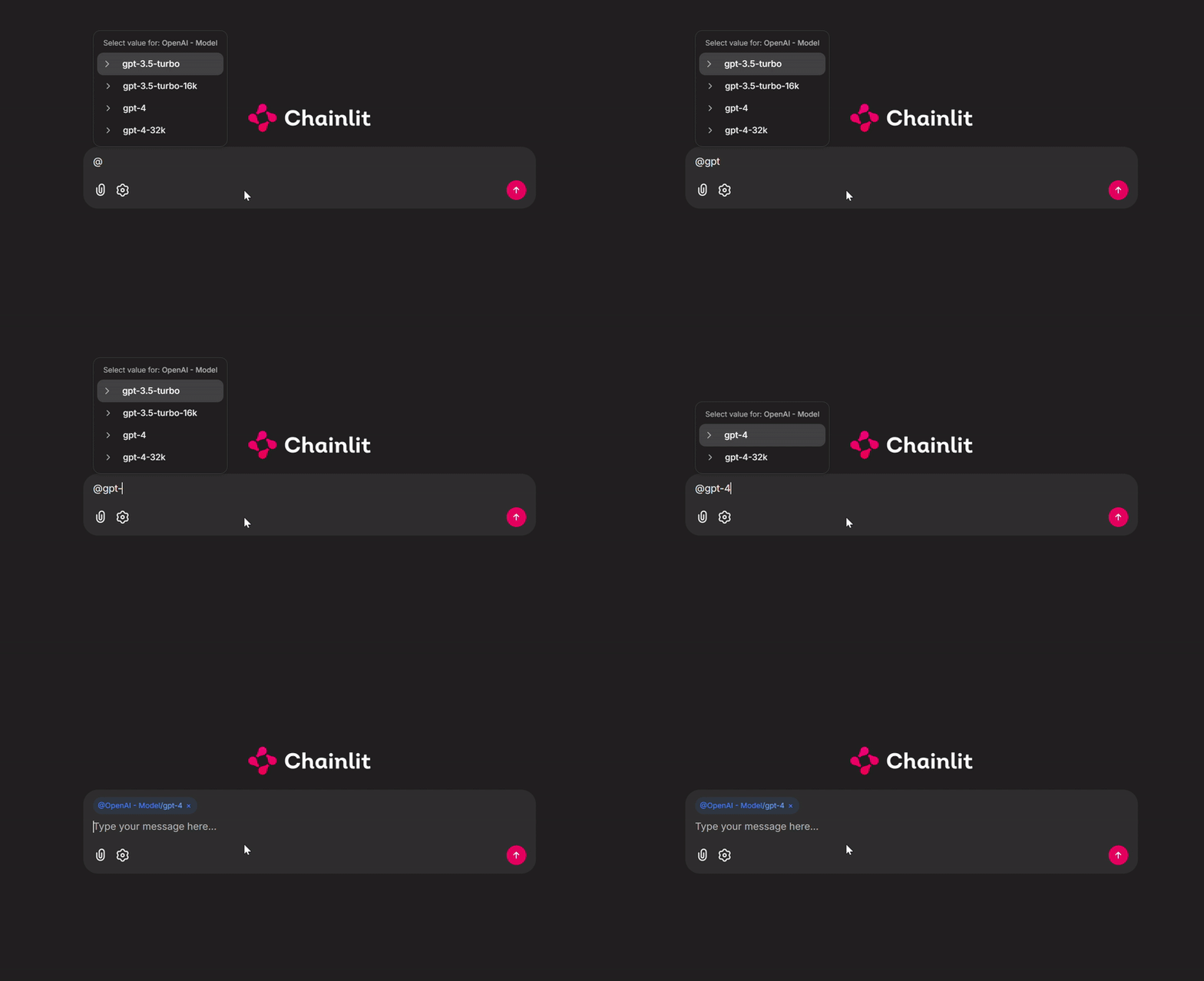
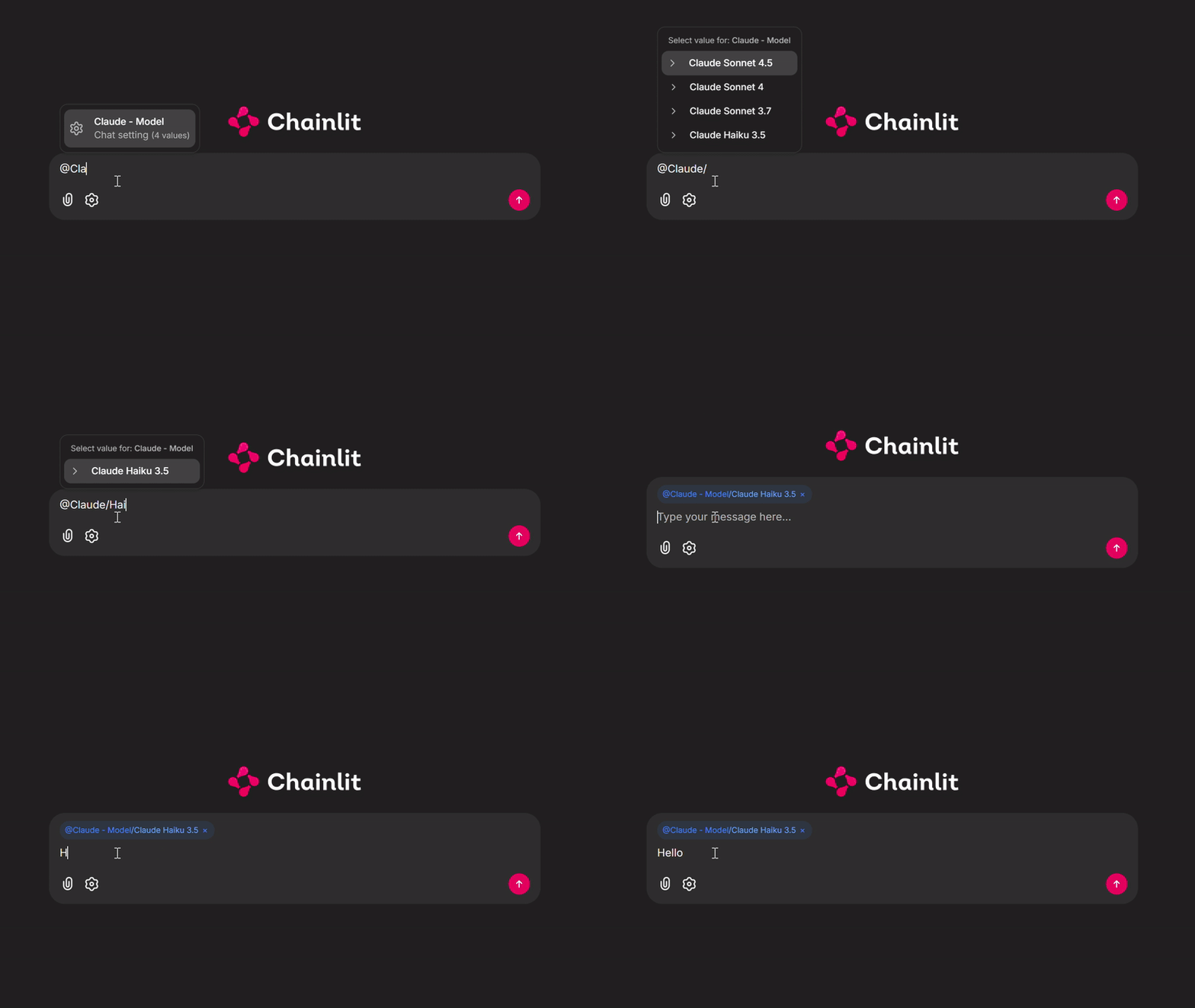
You can also access the Chainlit chat settings using a combination of the `@` and `/` commands. Using `@`, you can trigger the chat settings **Select** input, and using `/`, you can choose the selected setting’s input values.
### Single Select option Type
 ### Multi Select option Type
 ## Dynamic Widget Refresh
Use `refresh()` inside `@cl.on_settings_edit` to update the form dynamically as the user edits, without committing changes to the session. The committed session settings only change when the user confirms (triggers `@cl.on_settings_update`).
```python theme={null}
import chainlit as cl
from chainlit.input_widget import Select, Slider
@cl.on_chat_start
async def start():
await cl.ChatSettings(
[
Select(
id="Mode",
label="Mode",
values=["simple", "advanced"],
initial_index=0,
),
Slider(
id="Temperature",
label="Temperature",
initial=0.7,
min=0,
max=2,
step=0.1,
),
]
).send()
@cl.on_settings_edit
async def on_edit(settings):
inputs = [
Select(
id="Mode",
label="Mode",
values=["simple", "advanced"],
initial_value=settings["Mode"],
),
Slider(
id="Temperature",
label="Temperature",
initial=settings.get("Temperature", 0.7),
min=0,
max=2,
step=0.1,
),
]
if settings["Mode"] == "advanced":
inputs.append(
Slider(
id="TopP",
label="Top P",
initial=settings.get("TopP", 0.9),
min=0,
max=1,
step=0.05,
)
)
await cl.ChatSettings(inputs).refresh()
@cl.on_settings_update
async def on_update(settings):
print("Confirmed settings:", settings)
```
Since version **2.11.0**.
## Tabs
Use `Tab` to group settings into named tabs when you have many inputs across distinct categories.
```python theme={null}
import chainlit as cl
from chainlit.input_widget import Select, Slider, Tab
@cl.on_chat_start
async def start():
settings = await cl.ChatSettings(
tabs=[
Tab(
id="llm",
label="LLM",
inputs=[
Select(
id="Model",
label="Model",
values=["gpt-4o", "gpt-4o-mini", "gpt-4-turbo"],
initial_index=0,
),
Slider(
id="Temperature",
label="Temperature",
initial=0.7,
min=0,
max=2,
step=0.1,
),
],
),
Tab(
id="image",
label="Image",
inputs=[
Slider(
id="Width",
label="Image Width",
initial=512,
min=256,
max=2048,
step=64,
),
Slider(
id="Height",
label="Image Height",
initial=512,
min=256,
max=2048,
step=64,
),
],
),
]
).send()
@cl.on_settings_update
async def setup_agent(settings):
print("on_settings_update", settings)
```
Since version **2.9.1**.
## Dynamic Widget Refresh
Use `refresh()` inside `@cl.on_settings_edit` to update the form dynamically as the user edits, without committing changes to the session. The committed session settings only change when the user confirms (triggers `@cl.on_settings_update`).
```python theme={null}
import chainlit as cl
from chainlit.input_widget import Select, Slider
@cl.on_chat_start
async def start():
await cl.ChatSettings(
[
Select(
id="Mode",
label="Mode",
values=["simple", "advanced"],
initial_index=0,
),
Slider(
id="Temperature",
label="Temperature",
initial=0.7,
min=0,
max=2,
step=0.1,
),
]
).send()
@cl.on_settings_edit
async def on_edit(settings):
inputs = [
Select(
id="Mode",
label="Mode",
values=["simple", "advanced"],
initial_value=settings["Mode"],
),
Slider(
id="Temperature",
label="Temperature",
initial=settings.get("Temperature", 0.7),
min=0,
max=2,
step=0.1,
),
]
if settings["Mode"] == "advanced":
inputs.append(
Slider(
id="TopP",
label="Top P",
initial=settings.get("TopP", 0.9),
min=0,
max=1,
step=0.05,
)
)
await cl.ChatSettings(inputs).refresh()
@cl.on_settings_update
async def on_update(settings):
print("Confirmed settings:", settings)
```
Since version **2.11.0**.
## Tabs
Use `Tab` to group settings into named tabs when you have many inputs across distinct categories.
```python theme={null}
import chainlit as cl
from chainlit.input_widget import Select, Slider, Tab
@cl.on_chat_start
async def start():
settings = await cl.ChatSettings(
tabs=[
Tab(
id="llm",
label="LLM",
inputs=[
Select(
id="Model",
label="Model",
values=["gpt-4o", "gpt-4o-mini", "gpt-4-turbo"],
initial_index=0,
),
Slider(
id="Temperature",
label="Temperature",
initial=0.7,
min=0,
max=2,
step=0.1,
),
],
),
Tab(
id="image",
label="Image",
inputs=[
Slider(
id="Width",
label="Image Width",
initial=512,
min=256,
max=2048,
step=64,
),
Slider(
id="Height",
label="Image Height",
initial=512,
min=256,
max=2048,
step=64,
),
],
),
]
).send()
@cl.on_settings_update
async def setup_agent(settings):
print("on_settings_update", settings)
```
Since version **2.9.1**.