> ## Documentation Index
> Fetch the complete documentation index at: https://docs.chainlit.io/llms.txt
> Use this file to discover all available pages before exploring further.
# LangChain/LangGraph
In this tutorial, we'll walk through the steps to create a Chainlit application integrated with [LangChain](https://github.com/hwchase17/langchain).
 ## Prerequisites
Before getting started, make sure you have the following:
* A working installation of Chainlit
* The LangChain package installed
* An OpenAI API key
* Basic understanding of Python programming
## Step 1: Create a Python file
Create a new Python file named `app.py` in your project directory. This file will contain the main logic for your LLM application.
## Step 2: Write the Application Logic
In `app.py`, import the necessary packages and define one function to handle a new chat session and another function to handle messages incoming from the UI.
### With LangChain
Let's go through a small example.
If your agent/chain does not have an async implementation, fallback to the
sync implementation.
```python Async LCEL theme={null}
from langchain_openai import ChatOpenAI
from langchain.prompts import ChatPromptTemplate
from langchain.schema import StrOutputParser
from langchain.schema.runnable import Runnable
from langchain.schema.runnable.config import RunnableConfig
from typing import cast
import chainlit as cl
@cl.on_chat_start
async def on_chat_start():
model = ChatOpenAI(streaming=True)
prompt = ChatPromptTemplate.from_messages(
[
(
"system",
"You're a very knowledgeable historian who provides accurate and eloquent answers to historical questions.",
),
("human", "{question}"),
]
)
runnable = prompt | model | StrOutputParser()
cl.user_session.set("runnable", runnable)
@cl.on_message
async def on_message(message: cl.Message):
runnable = cast(Runnable, cl.user_session.get("runnable")) # type: Runnable
msg = cl.Message(content="")
async for chunk in runnable.astream(
{"question": message.content},
config=RunnableConfig(callbacks=[cl.LangchainCallbackHandler()]),
):
await msg.stream_token(chunk)
await msg.send()
```
```python Sync LCEL theme={null}
from langchain_openai import ChatOpenAI
from langchain.prompts import ChatPromptTemplate
from langchain.schema import StrOutputParser
from langchain.schema.runnable import Runnable
from langchain.schema.runnable.config import RunnableConfig
import chainlit as cl
@cl.on_chat_start
async def on_chat_start():
model = ChatOpenAI(streaming=True)
prompt = ChatPromptTemplate.from_messages(
[
(
"system",
"You're a very knowledgeable historian who provides accurate and eloquent answers to historical questions.",
),
("human", "{question}"),
]
)
runnable = prompt | model | StrOutputParser()
cl.user_session.set("runnable", runnable)
@cl.on_message
async def on_message(message: cl.Message):
runnable = cl.user_session.get("runnable") # type: Runnable
msg = cl.Message(content="")
for chunk in await cl.make_async(runnable.stream)(
{"question": message.content},
config=RunnableConfig(callbacks=[cl.LangchainCallbackHandler()]),
):
await msg.stream_token(chunk)
await msg.send()
```
This code sets up an instance of `Runnable` with a custom `ChatPromptTemplate` for each chat session. The `Runnable` is invoked everytime a user sends a message to generate the response.
The callback handler is responsible for listening to the chain's intermediate steps and sending them to the UI.
### With LangGraph
```python theme={null}
from typing import Literal
from langchain_core.tools import tool
from langchain_openai import ChatOpenAI
from langgraph.prebuilt import ToolNode
from langchain.schema.runnable.config import RunnableConfig
from langchain_core.messages import HumanMessage
import chainlit as cl
@tool
def get_weather(city: Literal["nyc", "sf"]):
"""Use this to get weather information."""
if city == "nyc":
return "It might be cloudy in nyc"
elif city == "sf":
return "It's always sunny in sf"
else:
raise AssertionError("Unknown city")
tools = [get_weather]
model = ChatOpenAI(model_name="gpt-3.5-turbo", temperature=0)
final_model = ChatOpenAI(model_name="gpt-3.5-turbo", temperature=0)
model = model.bind_tools(tools)
# NOTE: this is where we're adding a tag that we'll can use later to filter the model stream events to only the model called in the final node.
# This is not necessary if you call a single LLM but might be important in case you call multiple models within the node and want to filter events
# from only one of them.
final_model = final_model.with_config(tags=["final_node"])
tool_node = ToolNode(tools=tools)
from typing import Annotated
from typing_extensions import TypedDict
from langgraph.graph import END, StateGraph, START
from langgraph.graph.message import MessagesState
from langchain_core.messages import BaseMessage, SystemMessage, HumanMessage
def should_continue(state: MessagesState) -> Literal["tools", "final"]:
messages = state["messages"]
last_message = messages[-1]
# If the LLM makes a tool call, then we route to the "tools" node
if last_message.tool_calls:
return "tools"
# Otherwise, we stop (reply to the user)
return "final"
def call_model(state: MessagesState):
messages = state["messages"]
response = model.invoke(messages)
# We return a list, because this will get added to the existing list
return {"messages": [response]}
def call_final_model(state: MessagesState):
messages = state["messages"]
last_ai_message = messages[-1]
response = final_model.invoke(
[
SystemMessage("Rewrite this in the voice of Al Roker"),
HumanMessage(last_ai_message.content),
]
)
# overwrite the last AI message from the agent
response.id = last_ai_message.id
return {"messages": [response]}
builder = StateGraph(MessagesState)
builder.add_node("agent", call_model)
builder.add_node("tools", tool_node)
# add a separate final node
builder.add_node("final", call_final_model)
builder.add_edge(START, "agent")
builder.add_conditional_edges(
"agent",
should_continue,
)
builder.add_edge("tools", "agent")
builder.add_edge("final", END)
graph = builder.compile()
@cl.on_message
async def on_message(msg: cl.Message):
config = {"configurable": {"thread_id": cl.context.session.id}}
cb = cl.LangchainCallbackHandler()
final_answer = cl.Message(content="")
for msg, metadata in graph.stream({"messages": [HumanMessage(content=msg.content)]}, stream_mode="messages", config=RunnableConfig(callbacks=[cb], **config)):
if (
msg.content
and not isinstance(msg, HumanMessage)
and metadata["langgraph_node"] == "final"
):
await final_answer.stream_token(msg.content)
await final_answer.send()
```
## Step 3: Run the Application
To start your app, open a terminal and navigate to the directory containing `app.py`. Then run the following command:
```bash theme={null}
chainlit run app.py -w
```
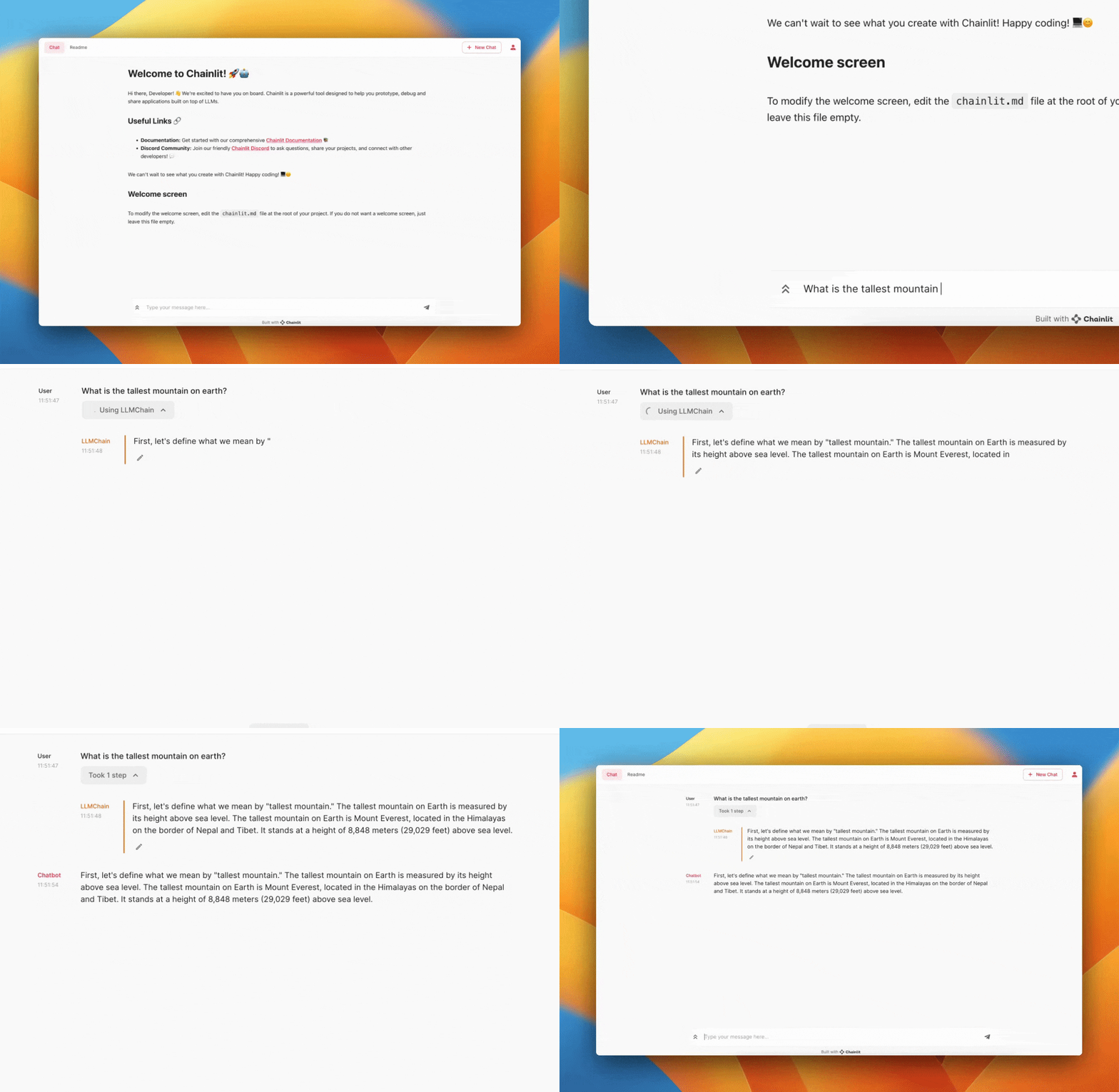
The `-w` flag tells Chainlit to enable auto-reloading, so you don't need to restart the server every time you make changes to your application. Your chatbot UI should now be accessible at [http://localhost:8000](http://localhost:8000).
When using LangChain, prompts and completions are not cached by default. To
enable the cache, set the `cache=true` in your chainlit config file.
## Prerequisites
Before getting started, make sure you have the following:
* A working installation of Chainlit
* The LangChain package installed
* An OpenAI API key
* Basic understanding of Python programming
## Step 1: Create a Python file
Create a new Python file named `app.py` in your project directory. This file will contain the main logic for your LLM application.
## Step 2: Write the Application Logic
In `app.py`, import the necessary packages and define one function to handle a new chat session and another function to handle messages incoming from the UI.
### With LangChain
Let's go through a small example.
If your agent/chain does not have an async implementation, fallback to the
sync implementation.
```python Async LCEL theme={null}
from langchain_openai import ChatOpenAI
from langchain.prompts import ChatPromptTemplate
from langchain.schema import StrOutputParser
from langchain.schema.runnable import Runnable
from langchain.schema.runnable.config import RunnableConfig
from typing import cast
import chainlit as cl
@cl.on_chat_start
async def on_chat_start():
model = ChatOpenAI(streaming=True)
prompt = ChatPromptTemplate.from_messages(
[
(
"system",
"You're a very knowledgeable historian who provides accurate and eloquent answers to historical questions.",
),
("human", "{question}"),
]
)
runnable = prompt | model | StrOutputParser()
cl.user_session.set("runnable", runnable)
@cl.on_message
async def on_message(message: cl.Message):
runnable = cast(Runnable, cl.user_session.get("runnable")) # type: Runnable
msg = cl.Message(content="")
async for chunk in runnable.astream(
{"question": message.content},
config=RunnableConfig(callbacks=[cl.LangchainCallbackHandler()]),
):
await msg.stream_token(chunk)
await msg.send()
```
```python Sync LCEL theme={null}
from langchain_openai import ChatOpenAI
from langchain.prompts import ChatPromptTemplate
from langchain.schema import StrOutputParser
from langchain.schema.runnable import Runnable
from langchain.schema.runnable.config import RunnableConfig
import chainlit as cl
@cl.on_chat_start
async def on_chat_start():
model = ChatOpenAI(streaming=True)
prompt = ChatPromptTemplate.from_messages(
[
(
"system",
"You're a very knowledgeable historian who provides accurate and eloquent answers to historical questions.",
),
("human", "{question}"),
]
)
runnable = prompt | model | StrOutputParser()
cl.user_session.set("runnable", runnable)
@cl.on_message
async def on_message(message: cl.Message):
runnable = cl.user_session.get("runnable") # type: Runnable
msg = cl.Message(content="")
for chunk in await cl.make_async(runnable.stream)(
{"question": message.content},
config=RunnableConfig(callbacks=[cl.LangchainCallbackHandler()]),
):
await msg.stream_token(chunk)
await msg.send()
```
This code sets up an instance of `Runnable` with a custom `ChatPromptTemplate` for each chat session. The `Runnable` is invoked everytime a user sends a message to generate the response.
The callback handler is responsible for listening to the chain's intermediate steps and sending them to the UI.
### With LangGraph
```python theme={null}
from typing import Literal
from langchain_core.tools import tool
from langchain_openai import ChatOpenAI
from langgraph.prebuilt import ToolNode
from langchain.schema.runnable.config import RunnableConfig
from langchain_core.messages import HumanMessage
import chainlit as cl
@tool
def get_weather(city: Literal["nyc", "sf"]):
"""Use this to get weather information."""
if city == "nyc":
return "It might be cloudy in nyc"
elif city == "sf":
return "It's always sunny in sf"
else:
raise AssertionError("Unknown city")
tools = [get_weather]
model = ChatOpenAI(model_name="gpt-3.5-turbo", temperature=0)
final_model = ChatOpenAI(model_name="gpt-3.5-turbo", temperature=0)
model = model.bind_tools(tools)
# NOTE: this is where we're adding a tag that we'll can use later to filter the model stream events to only the model called in the final node.
# This is not necessary if you call a single LLM but might be important in case you call multiple models within the node and want to filter events
# from only one of them.
final_model = final_model.with_config(tags=["final_node"])
tool_node = ToolNode(tools=tools)
from typing import Annotated
from typing_extensions import TypedDict
from langgraph.graph import END, StateGraph, START
from langgraph.graph.message import MessagesState
from langchain_core.messages import BaseMessage, SystemMessage, HumanMessage
def should_continue(state: MessagesState) -> Literal["tools", "final"]:
messages = state["messages"]
last_message = messages[-1]
# If the LLM makes a tool call, then we route to the "tools" node
if last_message.tool_calls:
return "tools"
# Otherwise, we stop (reply to the user)
return "final"
def call_model(state: MessagesState):
messages = state["messages"]
response = model.invoke(messages)
# We return a list, because this will get added to the existing list
return {"messages": [response]}
def call_final_model(state: MessagesState):
messages = state["messages"]
last_ai_message = messages[-1]
response = final_model.invoke(
[
SystemMessage("Rewrite this in the voice of Al Roker"),
HumanMessage(last_ai_message.content),
]
)
# overwrite the last AI message from the agent
response.id = last_ai_message.id
return {"messages": [response]}
builder = StateGraph(MessagesState)
builder.add_node("agent", call_model)
builder.add_node("tools", tool_node)
# add a separate final node
builder.add_node("final", call_final_model)
builder.add_edge(START, "agent")
builder.add_conditional_edges(
"agent",
should_continue,
)
builder.add_edge("tools", "agent")
builder.add_edge("final", END)
graph = builder.compile()
@cl.on_message
async def on_message(msg: cl.Message):
config = {"configurable": {"thread_id": cl.context.session.id}}
cb = cl.LangchainCallbackHandler()
final_answer = cl.Message(content="")
for msg, metadata in graph.stream({"messages": [HumanMessage(content=msg.content)]}, stream_mode="messages", config=RunnableConfig(callbacks=[cb], **config)):
if (
msg.content
and not isinstance(msg, HumanMessage)
and metadata["langgraph_node"] == "final"
):
await final_answer.stream_token(msg.content)
await final_answer.send()
```
## Step 3: Run the Application
To start your app, open a terminal and navigate to the directory containing `app.py`. Then run the following command:
```bash theme={null}
chainlit run app.py -w
```
The `-w` flag tells Chainlit to enable auto-reloading, so you don't need to restart the server every time you make changes to your application. Your chatbot UI should now be accessible at [http://localhost:8000](http://localhost:8000).
When using LangChain, prompts and completions are not cached by default. To
enable the cache, set the `cache=true` in your chainlit config file.